TypingMaster 12 Series: Smarter training, deeper analytics, faster typing.
★ What's fixed in the latest build 12.01.980 →
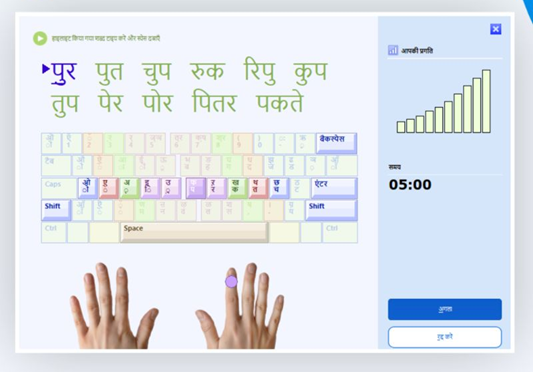 Hindi support, courses & layouts Hindi support, courses & layouts | 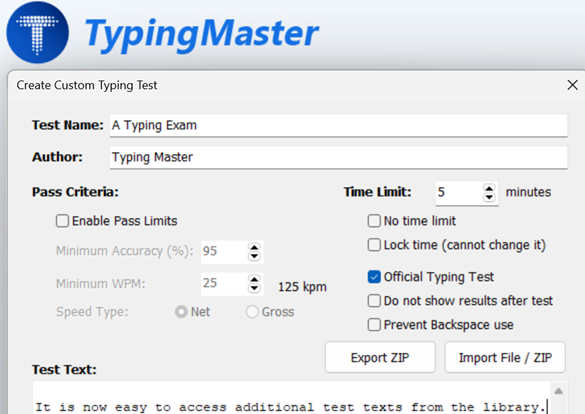 Advanced typing test settings |
Key improvements and new capabilities since TypingMaster 12.00.950
Typing Test Text Library: More custom texts, easier import
- Hindi support, a new InScript course & layouts
- Advanced typing test settings
- Custom Keyboard & layout upgrades
- Improved typing games
- UI and usability improvements
Keyboard & Layout Support
Improved game support for non-QWERTY layouts (Dvorak, Colemak, InScript, etc.)
- Custom and regional keyboard layouts improved
- One-click import for KeyMan keyboard layouts
- Improved AltGr handling and visual support for complex key combinations
- Language selector in Settings
Hindi Support (New)
Full Hindi typing support (courses, speed-building, UI, installer, and tests)
- Support for Hindi InScript and limited support for Remington (Keyman) layout
- Hindi-compatible typing games and review drills
- Various bug fixes, performance improvements, and stability enhancements
Key improvements and new capabilities since TypingMaster 11.0
- Updated TypingMeter with bigram analytics, heatmaps, and targeted practice drills
- Highly customizable typing tests (pass criteria, custom text, continue tests)
- Import and export typing tests with test pack support and text libraries (Premium)
- New and improved typing games (including Cloud Race and Pipe Game)
- Dark Mode and broad UI/UX refinements
- Instant activation of premium features after license entry
- Enhanced course editor and study material tools
- Improved difficult key detection and smarter typing feedback
- Universal Layouts Course supporting global and custom keyboards
- New lowercase-first typing course for beginners
- Support for usernames and typing data in all languages
Version 12.01.980 – Update Release Notes
Release Date: 2026-09-09
Summary: Major feature update focused on Hindi support, typing testing capabilities, and usability improvements.
Key Features & Improvements - Full release notes
Full Hindi Typing Support — new touch typing & speed-building courses, InScript layout support (except TypingMeter), improved review drills/lessons
- Enhanced Typing Tests — customizable tests, ZIP export/import, new text library & test packs, official exam reports for Hindi, disable-backspace/hide-results options
- Keyboard & Layout — one-click KEYMAN (.KMN) import, improved AltGr combinations, visual keyboard shows script combination keys
- Games & Practice — Hindi-compatible games, Pipe Game supports non-QWERTY layouts (Dvorak, Colemak, Hindi, etc.), practice with learned Hindi keys
- Unicode & File Support — improved Unicode compatibility, import UTF-8/Unicode/ANSI text files
- UX — Hindi-enabled installer & full Hindi UI, language selector in Settings, faster license activation, Hardware ID copy-to-clipboard
Detailed v12.01 Release Notes
16/09/2026 – Version 12.0.1.980B ⬇️ DOWNLOAD
- Hindi Course - Lessons 2, 6, 7 fixes
- Study Material Editor stability improvements
09/09/2026 – Version 12.0.1.980
- Shows a display scaling tip if the software appears too small on screen
- Update check timeout adjusted
- TypingMeter build 12.0.1.980 stability improvements
03/09/2026 – Version 12.0.1.979
- Fixed: database error 1551 on startup when the AppData path contains Unicode characters
- Fixed: Report Preview crash when no printers are installed (includes PDF output)
- TypingMeter is no longer installed on systems where it is unsupported due to OS or regional limitations (e.g. Hindi, Chinese keyboards + Login User Names)
28/08/2026 – Version 12.0.1.978
- Invalid license keys now show a clearer, more specific error message
- Certain license activation failures are now resolved automatically with a descriptive error message
14/08/2026 – v12.0.1.977
- Improved PDF quality when clicking Save PDF
11/08/2026 – v12.0.1.976
- Improved Typing Meter launch screen
- Hindi cosmetic and font-size fixes
- Improved splash screen auto-update timeout
05/08/2026 – v12.0.1.975
- Fixed ARM crash with Hindi lessons
- Improved Hindi (Devanagari) font rendering
- Increased Hindi Devanagari font size
04/08/2026 – v12.0.1.974
- Improved TypingMeter module stability and Windows 7 compatibility
- Fixed Lowercase Mastery course showing wrong accuracy / garbled keyboard image
- Fixed uneven repetition counts in Hindi key lessons causing abrupt drill endings
27/04/2026 – v12.0.1.973
- Fixed "#4000 NO MAPPING FOR UNICODE CHARACTER" error in German Lesson 1.2
17/04/2026 – v12.0.1.972
- Improved Hindi Traditional InScript course
- Fixed missing keys in chosen-layout view
- Improved test sheet report
08/04/2026 – v12.0.1.971
- Hindi Bubbles Game fixes
- ABC Game cosmetic fixes
08/04/2026 – v12.0.1.969
- Adjusted Hindi typing exam reports
- Hindi lesson fixes; improved Windows 7 support
07/04/2026 – v12.0.1.968
- Added new Hindi typing exam reports
- Updated keyboard display for script combination keys (e.g., Remington)
- Added KEYMAN (.KMN) layout support
- Added limited Hindi Remington Gail SIL layout support (Universal Course compatible)
- Improved AltGr handling for custom layouts
30/03/2026 – v12.0.1.966
- Pipe Game now supports non-QWERTY keyboards
- Improved Hindi speed-building course
- Games page supports practicing learned Hindi keys
- Added UI language selector in Settings
27/03/2026 – v12.0.1.965
- Improved Hindi Clouds and CloudRace games
- Enhanced Hindi review drills
- Improved English review in Universal Course
- Premium features activate instantly after license entry
25/03/2026 – v12.0.1.964
- Added text file import (UTF-8, Unicode, ANSI)
- Improved Hindi games: Bubbles, WordTris, ABC
- Enhanced Hindi layouts and speed-building courses
24/03/2026 – v12.0.1.963
- Fixed Study Material Editor issues
- Official typing test UI: hidden Next button during tests
- Improved Shift key instructions (Lesson 5)
19/03/2026 – v12.0.1.962
- Fixed ZIP import issues (line-feed handling, settings preservation)
- Improved Hindi difficult-keys training
- Fixed Hindi key drill issues
18/03/2026 – v12.0.1.960
- Hindi installer with language selection
- Full Hindi typing courses (touch typing + speed building)
- Full Hindi and Unicode UI support
- Fixed unnecessary BigramData folder creation
- Added Hardware ID copy feature
- Added Prevent Backspace and Hide Test Results options
- Added export/import for custom typing tests (ZIP)
Previous Version 12.00 – Combined Release Notes (v12.0.0.950)
Major New Features & Improvements
- Typing Test Enhancements
- Fully customizable typing test settings (time, speed limits, accuracy targets)
- Support for custom text (file import or copy/paste)
- Continue typing when retaking the same test
- Improved review and reporting screens
- Last word loss issue fixed
- TypingMeter & Analytics Overhaul
- Introduction of Bigram (key-pair) analysis for detailed typing insights
- Personalized bigram-based training exercises
- Heatmap visualization of key transitions
- Improved accuracy tracking and performance (up to 200 WPM)
- Word monitoring disabled by default (focus on key & key-pair analysis)
- Multiple bug fixes (capitalization issues, dead keys, review errors)
- New Typing Configuration Profile
- Simplified onboarding for new users with profile-based setup
- Universal Typing Course
- Works with all ANSI/ISO and custom keyboard layouts
- Expanded drills and gameplay support
- Lowercase-focused beginner course (5–8 hour program)
- Custom Keyboard Support
- Import and train with any keyboard layout (KLC support)
- Improved detection (ANSI/ISO Enter, layout parsing)
- Custom review and targeted key practice
- Dark Mode
- New Dark Mode with multiple UI and theme fixes
- Option to restart app when switching modes
⌨ Keyboard Layouts & Language Support
- Added layouts:
- Czech (QWERTY & QWERTZ), Hungarian (QWERTY & QWERTZ)
- Polish, Romanian, Estonian
- Kannada, Bengali, Tamil, Khmer, Thai, Vietnamese
- Latin American, Hindi, English (India), Colemak
- Improved support for:
- Unicode input and multilingual user names
- Accent/dead keys (ñ, á, é, ö, etc.)
- Regional settings (including Japanese)
Games & Interactive Features
- New Cloud Race game (speed + accuracy)
- Pipe game improvements and bug fixes
- Games now supported in Universal Typing Course
- High score system improvements (Unicode support, reports)
Training & Accuracy Improvements
- Improved Difficult Keys detection (lesson & course-specific accuracy)
- Enhanced bigram detection and training
- Better tricky bigram recognition and analytics
- Key and key-pair based performance tracking improvements
Bug Fixes & Stability
- Fixed Cloud Race issues with accented characters
- Resolved multiple TypingMeter bugs (dead keys, capitalization, progress errors)
- Fixed installer and upgrade issues
- Addressed crashes (e.g., Error -4000, Error #7922)
- Fixed lesson-specific issues (Swedish, Finnish, German, Italian, Portuguese)
- Corrected summary report issues (e.g., missing course name)
- General UI, performance, and stability improvements
UI, UX & Misc Improvements
- Improved Study Material Editor
- Better font rendering and readability
- Multi-screen support for TypingMeter widget
- “Return Widget to Screen” feature added
- Larger small font sizes and general UI polish
- Start Menu branding updated
Was this article helpful?
That’s Great!
Thank you for your feedback
Sorry! We couldn't be helpful
Thank you for your feedback
Feedback sent
We appreciate your effort and will try to fix the article