TypingMaster 12.01 – Key Features & Improvements
★ What's fixed in the latest build 12.01.980 →
Full Hindi Typing Support
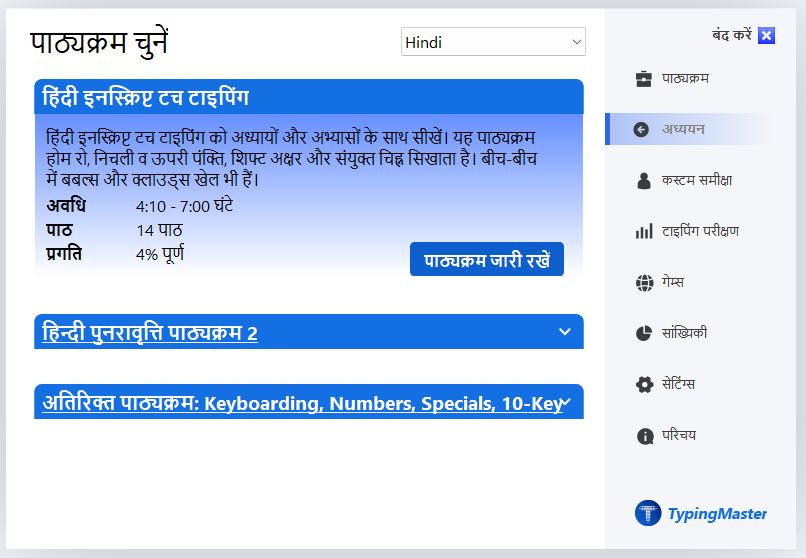
- New Hindi touch typing and speed-building courses
- Full support for the Hindi InScript layout (TypingMeter does not support Hindi)
- Improved Hindi review drills and lessons
Enhanced Typing Tests
- Advanced customizable typing tests
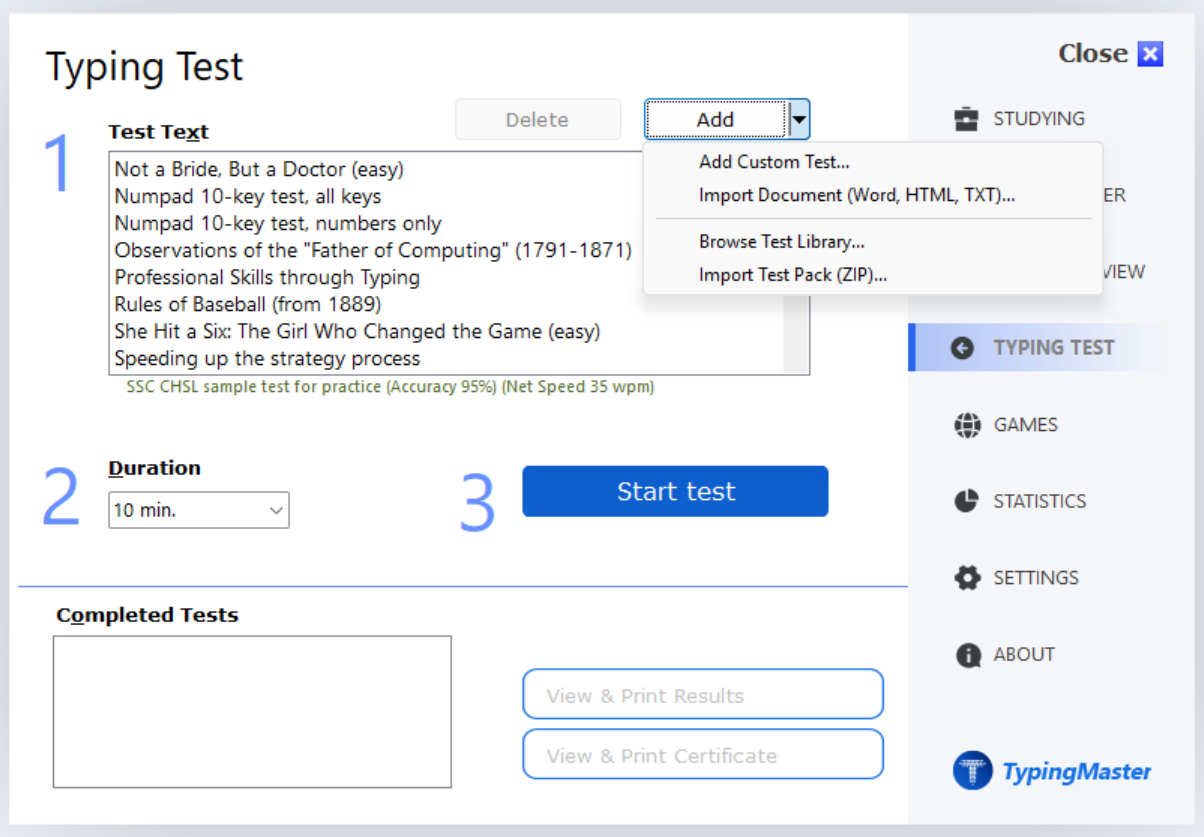
- Import and export typing tests (ZIP format)
- New typing test text library with test pack support
- Alternative exam report generation for Hindi typing tests
- Advanced options to disable backspace and hide results
- Improved typing test UI for exam conditions
Keyboard & Layout Improvements
- One-click import for KEYMAN keyboard layouts (.KMN)
- Improved AltGr key combinations
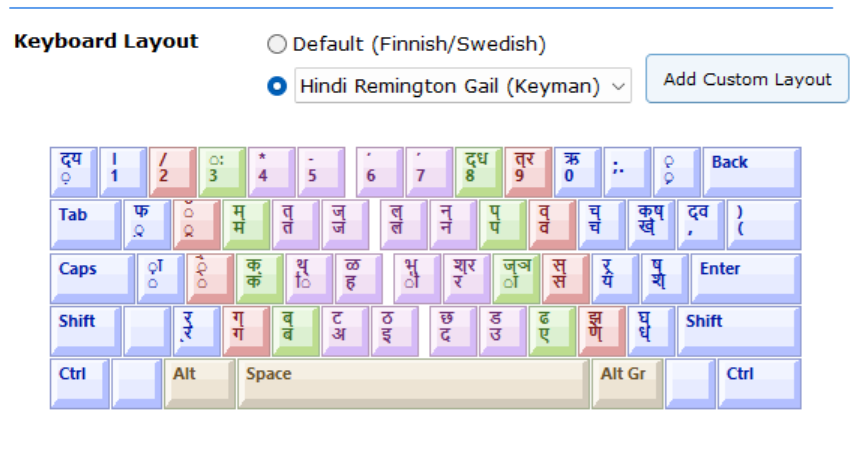
- Visual keyboard now displays script combination keys
- New Hindi keyboard layouts
- Universal Course supports Hindi Remington (Keyman) layouts
Games & Practice
- Pipe Game now supports non-QWERTY layouts (Dvorak, Colemak, Hindi, etc.)
- Hindi-compatible typing games
- Option to play games using learned Hindi keys
- ABC Game improved
Unicode & File Support
- Improved Unicode compatibility
- Import text files in UTF-8, Unicode, and ANSI formats
- Fixes in Study Material Editor
User Experience Enhancements
- Language selector added to Settings
- Hindi-enabled installer
- Full Hindi UI support
- Faster license activation
- Hardware ID copy-to-clipboard feature
- Improved English review in Universal Course
A new Typing Test Text Library and Test Pack Import Feature
Version 12.01 introduces comprehensive Hindi typing support:
⬇️ DOWNLOAD LATEST TYPINGMASTER 12.01
Detailed Release Notes
09/09/2026 – Version 12.0.1.980 ⬇️ DOWNLOAD
- Shows a display scaling tip if the software appears too small on screen
- Update check timeout adjusted
- TypingMeter build 12.0.1.980 stability improvements
03/09/2026 – Version 12.0.1.979
- Fixed: database error 1551 on startup when the AppData path contains Unicode characters
- Fixed: Report Preview crash when no printers are installed (includes PDF output)
- TypingMeter is no longer installed on systems where it is unsupported due to OS or regional limitations (e.g. Hindi, Chinese keyboards + Login User Names)
28/08/2026 – Version 12.0.1.978
- Invalid license keys now show a clearer, more specific error message
- Certain license activation failures are now resolved automatically with a descriptive error message
14/08/2026 – Version 12.0.1.977
- Improved PDF output quality when saving reports as PDF
11/08/2026 – Version 12.0.1.976
- Improved the TypingMeter launch screen appearance
- Hindi UI cosmetic fixes and font size fixes
- Fixed a splash screen timeout that could cause the app to hang on startup
05/08/2026 – Version 12.0.1.975
- ARM Compatibility Improved: Fixed a crash occurring on ARM-based devices with Hindi lessons.
- Hindi Lessons: Improved Hindi (Devanagari) font rendering throughout the application.
- Hindi Devanagari Font Size is now larger.
04/08/2026 – Version 12.0.1.974
- Improved the stability of TypingMeter module (v12.0.1.974)
- Improved Windows 7 compatibility in the TypingMeter module (v12.0.1.974).
- Fixed the Lowercase mastery course in Extra Courses that was showing the wrong accuracy score, or displaying a garbled keyboard picture.
- Fixed a bug in the Hindi typing course where some key lessons had an uneven number of practice repetitions, causing certain drills to end abruptly.
27/04/2026 – Version 12.0.1.973
- Fixed a system error message -#4000 NO MAPPING FOR UNICODE CHARACTER occured in German Lesson 1.2
17/04/2026 – Version 12.0.1.972
- Hindi Traditional layout InScript course improved
- Missing Keys from chosen Layout view fixed
- Test Sheet Report improved
08/04/2026 – Version 12.0.1.971
- Hindi Bubbles Game fixes
- ABC Game Cosmetic fixes
08/04/2026 – Version 12.0.1.969
- Adjusted Hindi typing exam reports
- Hindi lesson fixes, Windows 7 support improved
07/04/2026 – Version 12.0.1.968
- Added a new Hindi typing exam reports
- Keyboard display updated for script combination keys (e.g., Remington)
- Added support for KEYMAN layouts (.KMN files)
- Added limited support for Hindi Remington Gail SIL layout (Universal Course compatible)
- Improved AltGr handling for custom layouts
30/03/2026 – Version 12.0.1.966
- Pipe Game now supports non-QWERTY keyboards
- Improved Hindi speed-building course
- Games page now supports practicing learned Hindi keys
- Added UI language selector in Settings
27/03/2026 – Version 12.0.1.965
- Improved Hindi Clouds and CloudRace games
- Enhanced Hindi review drills
- Improved English review in Universal Course
- Premium features now activate instantly after license entry
25/03/2026 – Version 12.0.1.964
- Added support for importing text files (UTF-8, Unicode, ANSI)
- Improved Hindi games: Bubbles, WordTris, ABC
- Enhanced Hindi layouts and speed-building courses
24/03/2026 – Version 12.0.1.963
- Fixed issues in Study Material Editor
- Official typing test UI improvements (hidden Next button during tests)
- Improved Shift key learning instructions (Lesson 5)
19/03/2026 – Version 12.0.1.962
- Fixed ZIP import issues (line feed handling and settings preservation)
- Improved Hindi difficult keys training
- Fixed Hindi key drill issues
18/03/2026 – Version 12.0.1.960
- Hindi installer with language selection
- Added full Hindi typing courses (touch typing + speed building)
- Full Hindi and Unicode UI support
- Fixed unnecessary BigramData folder creation
- Added Hardware ID copy feature
- Added:
- Prevent Backspace option
- Hide Test Results option
- Added export/import for custom typing tests (ZIP)
⚠ Known Limitations
(as of Version 12.0.1)
- TypingMeter is not available in the Hindi version
- TypingMeter does not support Unicode characters in folder paths or Windows usernames
- Hindi Remington Gail (Keyman) layout has limited review drills and practice content
Was this article helpful?
That’s Great!
Thank you for your feedback
Sorry! We couldn't be helpful
Thank you for your feedback
Feedback sent
We appreciate your effort and will try to fix the article