Custom Keyboard Layout File (.kbd) - Complete Format Reference
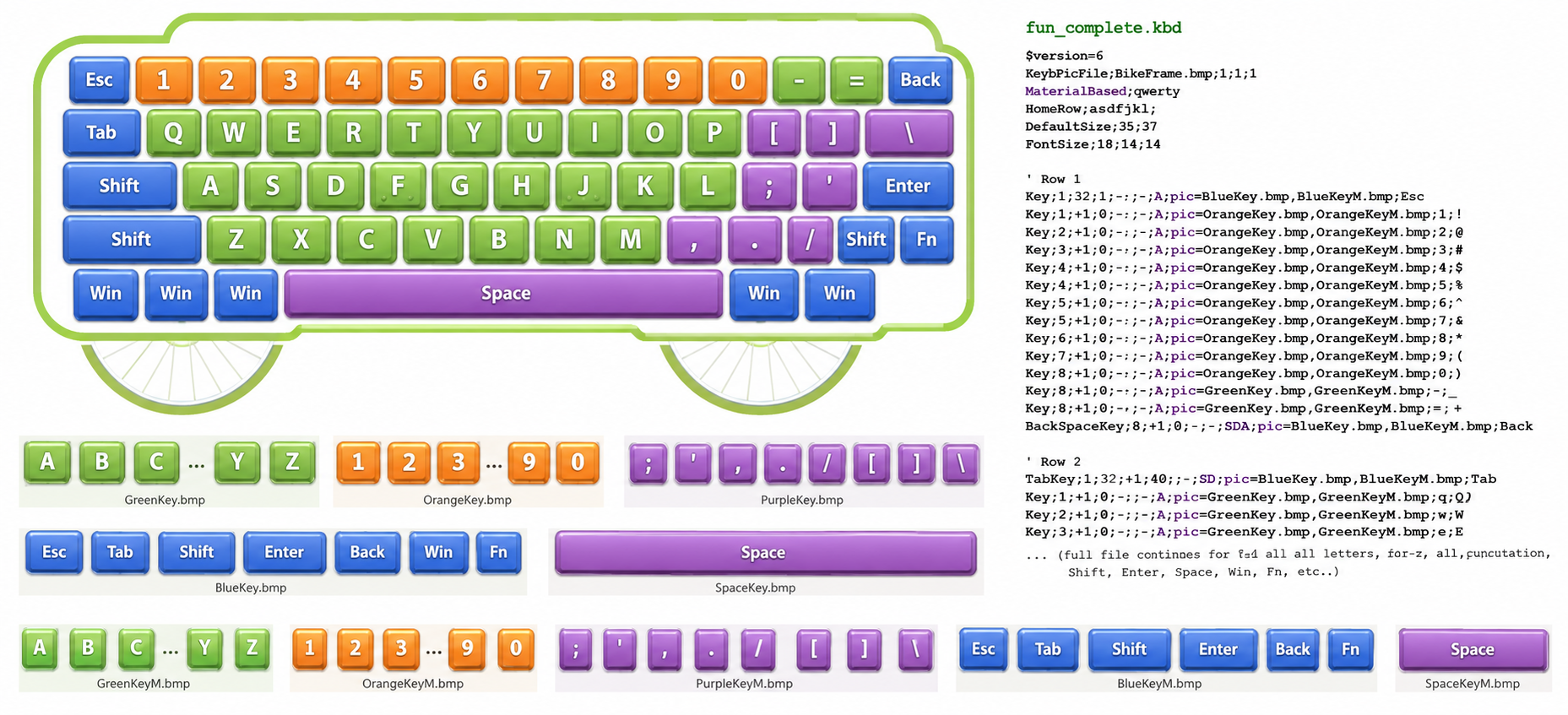
This document describes the .kbd file format in full detail. It is intended both as a FAQ for end users and as a specification for AI-assisted file generation. Once your layout is ready, copy the .kbd file into the keyboards subfolder. Then open tmkeyb.ini in the application folder and add a line for your new keyboard so the TypingMaster/TypingMagic typing tutor can find it. When you're done, head to the Settings page and pick your new keyboard layout to try it out.
We recommend starting with our KLE JSON Import tool to create the initial version of your layout visually. Then give the article below to your AI bot together with a photo of your keyboard, and ask it to tailor the file to match.
Overview
A .kbd file is a plain text file (UTF-8 BOM or ANSI, semicolon-delimited) that defines the visual layout and key assignments for a graphical on-screen keyboard control. The file must begin with a version header and is parsed line by line.
File version required:
$version=6
This must be the very first line.
Comments
Any line beginning with a single quote ' is a comment and is ignored by the parser.
'This is a comment
Global Settings (Header Directives)
These directives appear before any key definitions, though order is flexible. All directive names are case-insensitive.
KeyBowlData (see below - Marks this keyboard as a joystick / "bowl" type)
MaterialBased
MaterialBased;<layout>
Declares the physical keyboard layout this file assumes. Used for finger assignment logic and same-row lookups.
Valid values: qwerty, azerty, dvorak (need to match the .cnt files in lessons folder)
MaterialBased;qwerty
HomeRow
HomeRow;<8 characters>
Defines the 8 home row keys: left-hand fingers 1–4 (left pinky to left index), then right-hand fingers 5–8 (right index to right pinky).
The 8th character (right pinky) is also used internally as the semicolon replacement character. For QWERTY: asdfjkl;
HomeRow;asdfjkl;
DefaultSize
DefaultSize;<width>;<height>
Sets the fallback pixel size for any key that uses _ (underscore) in its width or height fields.
DefaultSize;41;41
FontSize
FontSize;<normal>;<small>;<index>
Sets the three font sizes used when rendering key labels.
| Name | Used for |
|---|---|
normal | Standard single-character keys |
small | Keys marked with flag s |
index | Upper/shifted character shown in corner |
FontSize;18;12;14
LayoutCode
LayoutCode;<hex-code>
Optional Windows keyboard layout code (e.g. 00000409 for US English). Used to activate the matching Windows input method when the course is opened.
DynamicLayout
DynamicLayout
If present, key characters are read from the actual installed Windows keyboard layout via scan codes at runtime, rather than from the literal values in the file.
CommaDot
CommaDot;<0|1>
If set to 1, swaps the comma and period keys for locales where they are physically reversed.
Key Type Lines
All key lines follow this general structure:
<KeyType>;<finger>;<x>;<y>;<width>;<height>;<flags>[;pic=<normal.bmp>,<marked.bmp>];<caption0>;<caption1>;...
Fields 2–6 (finger, x, y, width, height) use the same rules for all key types.
Coordinate and Size Fields
Finger (field 2): A number 1–10 indicating which finger presses this key:
- 1 = left pinky, 2 = left ring, 3 = left middle, 4 = left index
- 5 = right index, 6 = right middle, 7 = right ring, 8 = right pinky
- 9–10 = thumb
X and Y (fields 3–4): Pixel position of the top-left corner of the key.
Special prefix syntax:
+N— position is N pixels to the right/below the end of the previous key-N— position is N pixels before the end of the previous key0— reuse the previous key's value
Width and Height (fields 5–6):
- Positive integer: explicit pixel size
_(underscore or -1): useDefaultSize0— reuse the previous key's value
Flag Field (field 7)
A string containing zero or more of the following flag letters (case-insensitive). Use A for a plain active key with no special flags.
| Flag | Meaning |
|---|---|
A | Always active (never grayed out) |
N | Draw a nipple/bump indicator (home-row tactile dot) |
D | Dark style rendering |
H | Hidden — key is invisible unless highlighted |
S | Use small font |
Z | Highlight on error (show as highlighted instead of error state) |
Example: AN = always active + nipple.
Picture Keys (optional, field after flags)
If a key uses bitmap images instead of drawn rectangles, insert a pic= field after the flags field:
pic=<normal.bmp>,<marked.bmp>
normal.bmp— image shown in normal statemarked.bmp— image shown when highlighted/hinted
When a pic= field is present, all caption fields shift one position to the right.
Key Types
Key — Standard Key
Key;<finger>;<x>;<y>;<width>;<height>;<flags>;<caption0>;<caption1>
A regular keyboard key. caption0 is the unshifted character, caption1 is the shifted character.
Example:
Key;4;130;65;_;_;A;f;F Key;5;172;65;_;_;AN;j;J
VKey — Standard key with scan code support
VKey;<finger>;<x>;<y>;<width>;<height>;<flags>;<caption0>;<caption1>;<scancode>
Like Key but with an scan code in field 10, e.g. $10 = Q . Used for dynamic layout support. See 101usa.kbd as an example.
XKey — Non-character key (always active, no finger guidance)
XKey;<finger>;<x>;<y>;<width>;<height>;<flags>;<caption0>;<caption1>;<scancode>
Same as VKey but always treated as active.
EnterKey
EnterKey;<finger>;<x>;<y>;<width>;<height>;<flags>;<label>
Internally assigned ASCII 13. The label (e.g. Enter) is display-only.
SpaceKey
SpaceKey;<finger>;<x>;<y>;<width>;<height>;<flags>;<label>
Internally assigned ASCII 32.
TabKey
TabKey;<finger>;<x>;<y>;<width>;<height>;<flags>;<label>
Internally assigned ASCII 9.
BackspaceKey
BackspaceKey;<finger>;<x>;<y>;<width>;<height>;<flags>;<label>
Internally assigned ASCII 8.
CapsLockKey
CapsLockKey;<finger>;<x>;<y>;<width>;<height>;<flags>;<label>
CommaDotKey
CommaDotKey;<finger>;<x>;<y>;<width>;<height>;<flags>
A special key that dynamically reads the comma/dot from the system layout via scan code $53.
ControlKey — Modifier / Shift Key
ControlKey;<finger>;<x>;<y>;<width>;<height>;<flags>[;pic=...][;<index>;<label0>;<label1>;...]
A modifier key (Shift, Alt, AltGr, etc.) that activates additional caption layers on regular keys.
Key field: <index> — an integer that links this ControlKey to a caption slot on regular keys. Index 1 = Shift, index 2 = AltGr, etc. Both a left and right version of each index can coexist; the system chooses based on the finger of the key being looked up.
Captions after the index are the labels shown on the control key itself for each state.
Example (Shift key with picture):
ControlKey;1;83;68;61;38;AZ;pic=LKeyD.bmp,LKeyDM.bmp;10;Press Dome;
Here:
- finger=1, x=83, y=68, width=61, height=38
- flags=
AZ pic=LKeyD.bmp,LKeyDM.bmp— picture mode- index=10 (links to caption slot 10 on BowlKeys)
- label=
Press Dome
ShiftControlKey
ShiftControlKey;<finger>;<x>;<y>;<width>;<height>;<flags>;<index>;<labels...>
Same as ControlKey but the label is overridden with the localized word "Shift".
BowlKey — Radial Bowl Key
BowlKey;<finger>;<x>;<y>;<width>;<height>;<flags>[;pic=...];*;<cap1>;<cap2>;...;<cap8>;-;<cap9>;...;<cap16>
Used only in KeyBowlData keyboards. Supports up to 16 caption slots separated into two banks of 8, divided by a - separator.
- Captions 1–8 are the unshifted (left control) states
- After the
-separator, captions 9–16 are the shifted (right control) states *as the first caption means "this key is a bowl key entry point"_in any caption slot means "no character assigned here"#13is a special code for Enter (ASCII 13)#32is a special code for Space (ASCII 32)
Caption slots correspond to control key indices: slot N is activated when ControlKey with index N is held.
Special Caption Values
| Value | Meaning |
|---|---|
_ | Empty / no character |
#13 | Enter (carriage return, ASCII 13) |
#32 | Space (ASCII 32) |
* | Placeholder (used in BowlKey first position) |
% (percent+space) | Literal % character |
EMPTY | Empty string |
□ | Empty string (Unicode placeholder) |
NumPad Example:
$version=6
' International EDITION.  both comma and dot can be used.
' defaultsize for buttons having minus as width and height
MaterialBased;numpad
CommaDot;1
DefaultSize;35;34
FontSize;18;11;11
homerow;456+
' parameters for Key; finger;x;y;width;height; style; keycaption; keycaption.. max 10 items)
' x and y can be 0 which means previous one, or +n which adds n pixels to previous value
' width and heigth can be 0 previous one, or minus and defaultsize is used
' style can contain following keys - normal value is empty
'   n= small raised lines "nipples"
'   i= invisible
'   d= dark
'1. row
Key;5;300;1;-;-;SA;Num
Key;6;+1;0;-;-;-;/|÷
Key;7;+1;0;-;-;-;*
Key;7;+1;0;-;-;-;-
'2. row
Key;5;300;+1;-;-;-;7
Key;6;+1;0;-;-;-;8
Key;7;+1;0;-;-;-;9
Key;8;+1;0;-;69;-;+
'3. row
Key;5;300;-34;-;-;-;4
Key;6;+1;0;-;-;-;5
Key;7;+1;0;-;-;-;6
'4. row
Key;5;300;+1;-;-;-;1
Key;6;+1;0;-;-;-;2
Key;7;+1;0;-;-;-;3
EnterKey;8;+1;0;-;69;SA;
'5. row
Key;9;300;-34;71;-;-;0
commadotKey;7;+1;0;-;-;-;.|,
SpaceKey;10;30;0;229;-;AS;
Example: Bicycle Fun Keyboard for TypingMaster
This custom keyboard uses bitmap key images and a bicycle-themed background frame.
Installation:
- Unzip the template zip with pictures and .kbd file into the TypingMaster installation folder.
- Add the keyboard entry to tmkeyb.ini:
[Keyboard Layouts]
A bicycle=bicycle.kbd
- Start TypingMaster and select "Bicycle" from Keyboard Settings.
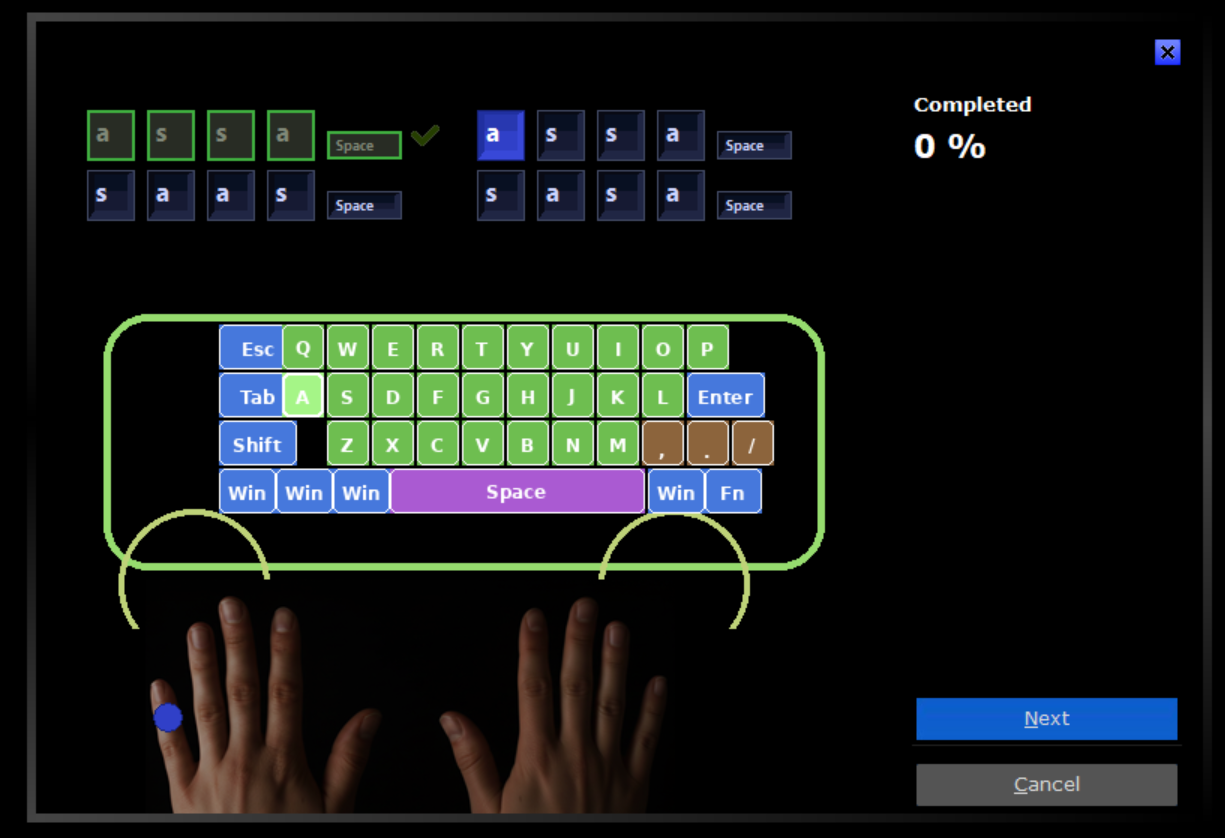 Features:
- Compact bicycle-themed layout.
- Custom bitmap keys using the pic= syntax.
- Large colorful keycaps for improved visibility.
- Bright highlighted key images for active key indication.
- Bicycle frame background optimized for 500×220 pixels.
- QWERTY layout with finger guidance support.
All bitmap images must remain in the program folder; otherwise the keyboard will display missing graphics.
THE BICYCLE.KBD EXAMPLE FILE :
$version=6


KeybPicFile;BikeFrame.bmp;1;1;
MaterialBased;qwerty
HomeRow;asdfjkl%;
DefaultSize;28;30
FontSize;12;10;10


'====================================
' ROW 1
'====================================


Key;1;88;18;40;30;A;pic=Esc.bmp,EscM.bmp;Esc


Key;1;130;18;28;30;A;pic=Key_Q.bmp,Key_QM.bmp;q;Q
Key;2;160;18;28;30;A;pic=Key_W.bmp,Key_WM.bmp;w;W
Key;3;190;18;28;30;A;pic=Key_E.bmp,Key_EM.bmp;e;E
Key;4;220;18;28;30;A;pic=Key_R.bmp,Key_RM.bmp;r;R
Key;4;250;18;28;30;A;pic=Key_T.bmp,Key_TM.bmp;t;T
Key;5;280;18;28;30;A;pic=Key_Y.bmp,Key_YM.bmp;y;Y
Key;5;310;18;28;30;A;pic=Key_U.bmp,Key_UM.bmp;u;U
Key;6;340;18;28;30;A;pic=Key_I.bmp,Key_IM.bmp;i;I
Key;7;370;18;28;30;A;pic=Key_O.bmp,Key_OM.bmp;o;O
Key;8;400;18;28;30;A;pic=Key_P.bmp,Key_PM.bmp;p;P


'====================================
' ROW 2
'====================================


TabKey;1;88;50;40;30;A;pic=Tab.bmp,TabM.bmp;Tab


Key;1;130;50;28;30;A;pic=Key_A.bmp,Key_AM.bmp;a;A
Key;2;160;50;28;30;A;pic=Key_S.bmp,Key_SM.bmp;s;S
Key;3;190;50;28;30;A;pic=Key_D.bmp,Key_DM.bmp;d;D


Key;4;220;50;28;30;AN;pic=Key_F.bmp,Key_FM.bmp;f;F
Key;4;250;50;28;30;A;pic=Key_G.bmp,Key_GM.bmp;g;G


Key;5;280;50;28;30;A;pic=Key_H.bmp,Key_HM.bmp;h;H
Key;5;310;50;28;30;A;pic=Key_J.bmp,Key_JM.bmp;j;J
Key;6;340;50;28;30;A;pic=Key_K.bmp,Key_KM.bmp;k;K
Key;7;370;50;28;30;A;pic=Key_L.bmp,Key_LM.bmp;l;L


EnterKey;8;400;50;52;30;A;pic=Enter.bmp,EnterM.bmp;Enter


'====================================
' ROW 3
'====================================


ControlKey;1;88;82;40;30;A;pic=Shift.bmp,ShiftM.bmp;1;Shift


Key;1;160;82;28;30;A;pic=Key_Z.bmp,Key_ZM.bmp;z;Z
Key;2;190;82;28;30;A;pic=Key_X.bmp,Key_XM.bmp;x;X
Key;3;220;82;28;30;A;pic=Key_C.bmp,Key_CM.bmp;c;C
Key;4;250;82;28;30;A;pic=Key_V.bmp,Key_VM.bmp;v;V
Key;4;280;82;28;30;A;pic=Key_B.bmp,Key_BM.bmp;b;B
Key;5;310;82;28;30;A;pic=Key_N.bmp,Key_NM.bmp;n;N
Key;5;340;82;28;30;A;pic=Key_M.bmp,Key_MM.bmp;m;M


Key;7;370;82;28;30;A;pic=Comma.bmp,CommaM.bmp;,;<
Key;8;400;82;28;30;A;pic=Dot.bmp,DotM.bmp;.;>
Key;8;430;82;28;30;A;pic=Slash.bmp,SlashM.bmp;/;?


'====================================
' ROW 4
'====================================


ControlKey;1;88;114;36;30;A;pic=Win.bmp,WinM.bmp;2;Win
ControlKey;2;126;114;36;30;A;pic=Win.bmp,WinM.bmp;2;Win
ControlKey;3;164;114;36;30;A;pic=Win.bmp,WinM.bmp;2;Win


SpaceKey;9;202;114;170;30;A;pic=SpaceKey.bmp,SpaceKeyM.bmp;Space


ControlKey;8;374;114;36;30;A;pic=Win.bmp,WinM.bmp;2;Win
ControlKey;8;412;114;36;30;A;pic=Fn.bmp,FnM.bmp;3;Fn
Complete Example: Keybowl Edition
KeyBowlData
KeyBowlData
Marks this keyboard as a joystick / "bowl" type — a radial or non-standard layout where finger guidance is disabled and keys use BowlKey rows instead of Key rows. When present, UseFingers is automatically set to False.
KeybPicFile
KeybPicFile;<filename>;<left>;<top>;<unused>
Draws a background bitmap image beneath the keys.
| Field | Description |
|---|---|
filename | BMP file name (relative path) |
left | X pixel offset for the image |
top | Y pixel offset for the image |
| last field | Reserved / ignored (e.g. 1) |
Example:
KeybPicFile;Keybowl.bmp;20;1;
The following is a full unconventional keyboard — a radial "bowl" design with 8 left control keys, 8 right bowl keys, a background image, and no standard QWERTY rows.
$version=6
'Keybowl Edition:
KeyBowlData
KeybPicFile;Keybowl.bmp;20;1;
'HomeRow indo
MaterialBased;qwerty
HomeRow;asdfjkl;
' defaultsize for buttons having minus as width and height
DefaultSize;41;41
FontSize;18;12;14
'LEFT DOME
ControlKey;1;83;68;61;38;AZ;pic=LKeyD.bmp,LKeyDM.bmp;10;Press Dome;
ControlKey;1;94;6;_;_;A;pic=LKey1.bmp,LKey1M.bmp;1;*
ControlKey;1;139;24;_;_;A;pic=LKey2.bmp,LKey2M.bmp;2;*
ControlKey;1;160;67;_;_;A;pic=LKey3.bmp,LKey3M.bmp;3;*
ControlKey;1;139;112;_;_;A;pic=LKey4.bmp,LKey4M.bmp;4;*
ControlKey;1;92;128;_;_;A;pic=LKey5.bmp,LKey5M.bmp;5;*
ControlKey;1;45;110;_;_;A;pic=LKey6.bmp,LKey6M.bmp;6;*
ControlKey;1;26;66;_;_;A;pic=LKey7.bmp,LKey7M.bmp;7;*
ControlKey;1;45;25;_;_;A;pic=LKey8.bmp,LKey8M.bmp;8;*

'RIGHT DOME
'1                                               1 2 3 4 5 6 7 8 - 1 2 3 4 5 6 7 8
BowlKey;1;328;6;_;_;A;pic=RKey1.bmp,RKey1M.bmp;*;e;_;r;_;o;0;a;w;_;E;_;R;_;O;);A;W;

'2                                                1 2 3 4 5 6 7 8 - 1 2 3 4 5 6 7 8
BowlKey;1;373;24;_;_;A;pic=RKey2.bmp,RKey2M.bmp;*;=;p;];_;_;9;f;1;_;+;P;};_;_;(;F;!;

'3                                                1 2 3   4 5 6 7 8 - 1 2 3 4 5 6 7 8
BowlKey;1;394;67;_;_;A;pic=RKey3.bmp,RKey3M.bmp;*;t;_;#32;_;c;8;d;2;_;T;_;_;_;C;*;D;@;

'4                                                 1 2 3 4 5 6 7 8 - 1 2 3 4 5 6 7 8
BowlKey;1;373;112;_;_;A;pic=RKey4.bmp,RKey4M.bmp;*;_;k;.;_;,;v;/;3;_;_;K;<;_;>;V;?;#;

'5                                                 1 2 3 4 5 6 7 8 - 1 2 3 4 5 6 7 8
BowlKey;1;326;128;_;_;A;pic=RKey5.bmp,RKey5M.bmp;*;i;_;l;b;m;6;s;4;_;I;_;L;B;M;_;S;$;

'6                                                 1 2 3 4 5 6 7 8 - 1 2 3 4 5 6 7 8
BowlKey;1;279;110;_;_;A;pic=RKey6.bmp,RKey6M.bmp;*;_;';_;v;n;z;\;5;_;_;";_;V;N;Z;|;%;

'7                                                1 2 3 4 5   6 7 8 - 1 2 3 4 5 6 7 8
BowlKey;1;260;66;_;_;A;pic=RKey7.bmp,RKey7M.bmp;*;u;j;h;_;#13;x;_;_;_;U;J;H;_;_;X;_;_;

'8                                                1 2 3 4 5 6 7 8 - 1 2 3 4 5 6 7 8
BowlKey;1;279;25;_;_;A;pic=RKey8.bmp,RKey8M.bmp;*;y;_;[;_;_;-;g;q;_;Y;_;{;_;_;_;G;Q;
How to read a BowlKey line
Take RKey1 as an example:
BowlKey;1;328;6;_;_;A;pic=RKey1.bmp,RKey1M.bmp;*;e;_;r;_;o;0;a;w;_;E;_;R;_;O;);A;W;
| Field | Value | Meaning |
|---|---|---|
| KeyType | BowlKey | Bowl-style key |
| Finger | 1 | Left pinky (irrelevant in bowl mode) |
| X | 328 | Horizontal pixel position |
| Y | 6 | Vertical pixel position |
| Width | _ | Use DefaultSize (41) |
| Height | _ | Use DefaultSize (41) |
| Flags | A | Always active |
| Pic | RKey1.bmp, RKey1M.bmp | Normal and marked images |
| * | — | Bowl key marker |
| Slot 1 | e | Ctrl1 pressed → outputs e |
| Slot 2 | _ | Ctrl2 pressed → nothing |
| Slot 3 | r | Ctrl3 pressed → outputs r |
| Slot 4 | _ | Ctrl4 pressed → nothing |
| Slot 5 | o | Ctrl5 pressed → outputs o |
| Slot 6 | 0 | Ctrl6 pressed → outputs 0 |
| Slot 7 | a | Ctrl7 pressed → outputs a |
| Slot 8 | w | Ctrl8 pressed → outputs w |
| — | — | Separator between unshifted and shifted banks |
| Slot 9 (Ctrl1+dome) | E | → E |
| Slot 10 | _ | → nothing |
| Slot 11 | R | → R |
| Slot 12 | _ | → nothing |
| Slot 13 | O | → O |
| Slot 14 | ) | → ) |
| Slot 15 | A | → A |
| Slot 16 | W | → W |
The large central ControlKey (index 10) is the "dome press" — pressing the dome itself activates the shifted bank (slots 9–16).
Building a Standard QWERTY Keyboard
US International Keyboard Traditional Layout
$version=6


' defaultsize for buttons having minus as width and height
MaterialBased;qwerty
HomeRow;asdfjkl%;
DefaultSize;32;34
FontSize;18;14;14


'1. row
Key;1;1;1;-;-;-;`;~
Key;1;+1;0;-;-;-;1;!; ; ;¡
Key;2;+1;0;-;-;-;2;@
Key;3;+1;0;-;-;-;3;#
Key;4;+1;0;-;-;-;4;$
Key;4;+1;0;-;-;-;5;%
Key;5;+7;0;-;-;-;6;^
Key;5;+1;0;-;-;-;7;&
Key;6;+1;0;-;-;-;8;*
Key;7;+1;0;-;-;-;9;(
Key;8;+1;0;-;-;-;0;)
Key;8;+1;0;-;-;-;-;_
Key;8;+1;0;-;-;-;=;+
Key;8;+1;0;-;-;-;\;|
BackSpaceKey;8;+1;0;32;0;DAS;


'2. row
TabKey;1;1;+1;48;-;SD;;
Key;1;+1;0;-;-;-;q;Q; ; ;ä
Key;2;+1;0;-;-;-;w;W; ; ;å
Key;3;+1;0;-;-;-;e;E; ; ;é
Key;4;+1;0;-;-;-;r;R
Key;4;+1;0;-;-;-;t;T
Key;5;+7;0;-;-;-;y;Y; ; ;ü
Key;5;+1;0;-;-;-;u;U; ; ;ú
Key;6;+1;0;-;-;-;i;I; ; ;í
Key;7;+1;0;-;-;-;o;O; ; ;ó
Key;8;+1;0;-;-;-;p;P; ; ;ö
Key;8;+1;0;-;-;-;[;{
Key;8;+1;0;-;-;-;];}
EnterKey;8;+1;0;49;70;DAS;


'3. row
CapsLockKey;1;1;72;57;-;SD;Caps;
Key;1;+1;0;-;-;-;a;A; ; ;á
Key;2;+1;0;-;-;-;s;S; ; ;ß
Key;3;+1;0;-;-;-;d;D
Key;4;+1;0;-;-;-;f;F
Key;4;+1;0;-;-;-;g;G
Key;5;+7;0;-;-;-;h;H
Key;5;+1;0;-;-;-;j;J
Key;6;+1;0;-;-;-;k;K
Key;7;+1;0;-;-;-;l;L
Key;8;+1;0;-;-;-;%;;:
Key;8;+1;0;-;-;-;';"; ; ;´


'4. row
ControlKey;1;1;+1;75;-;SDA;1;Shift
Key;1;+1;0;-;-;-;z;Z
Key;2;+1;0;-;-;-;x;X
Key;3;+1;0;-;-;-;c;C
Key;4;+1;0;-;-;-;v;V
Key;4;+1;0;-;-;-;b;B
Key;5;+7;0;-;-;-;n;N; ; ;ñ
Key;5;+1;0;-;-;-;m;M
Key;6;+1;0;-;-;-;,;<; ; ;ç
Key;7;+1;0;-;-;-;.;>
Key;8;+1;0;-;-;-;/;?; ; ;¿
ControlKey;8;+1;0;89;-;SDA;1;Shift


'5. row
ControlKey;1;1;+1;48;-;SD;2;Ctrl
ControlKey;1;+1;0;34;-;SD;2;
ControlKey;9;+1;0;48;-;SD;3;Alt
SpaceKey;9;+1;0;235;-;SA;
ControlKey;9;+1;0;48;-;SD;4;Alt
ControlKey;1;+1;0;34;-;SD;2;
ControlKey;8;+1;0;48;-;SD;2;Ctrl

Control;1;100;100;50;75;;1;Shift
Control;1;100;150;50;75;;2;Alt
AI Prompt - Rules Summary for AI Generation
Provide ChatGPT with:
A screenshot or photo of your desired keyboard design.
The existing
.kbdfile.The ZIP package containing the BMP images.
A copy of the TypingMaster
.kbdfile format specification.
ChatGPT can then:
Adjust key positions and sizes.
Create new bitmap keycaps and highlighted versions.
Design custom background images.
Generate complete
.kbdfiles with proper coordinates.Optimize the layout to fit the TypingMaster window.
Giving both an example picture and the current ZIP package usually produces the best results because the AI can see the intended appearance and reuse the existing artwork.
When generating a .kbd file, follow these rules:
- First line must be
$version=6. - Use
KeyBowlDataonly for radial/bowl keyboards; omit for standard keyboards. - All field separators are semicolons
;. - Lines starting with
'are comments — use freely. - Width/height
_means "use DefaultSize" — only valid after aDefaultSizedirective. - Width/height
0means "reuse the previous key's dimension". - X/Y
0means "reuse the previous key's position" — use explicit values to avoid ambiguity. ControlKeyindex numbers must match the caption slot positions inKey/BowlKeylines.- In
BowlKeylines, the-token separates the unshifted bank (slots 1–8) from the shifted bank (slots 9–16). - Use
_for any unused caption slot, never leave it blank. #13= Enter,#32= Space — use these inside caption slots, not literal characters.pic=is optional — if omitted, the system draws a standard 3D key rectangle.ShiftControlKeyindex1is the standard Shift — it activatescaption[1]on allKeylines.- AltGr is
ControlKeyindex 2 (or another agreed-upon index) and activatescaption[2]. - The
FontSizedirective uses negative-height pixel values internally; positive values in the file are converted automatically.
Was this article helpful?
That’s Great!
Thank you for your feedback
Sorry! We couldn't be helpful
Thank you for your feedback
Feedback sent
We appreciate your effort and will try to fix the article